
Download OverScene – AI-Powered Desktop Enhancement for Design, Coding & Creative Work
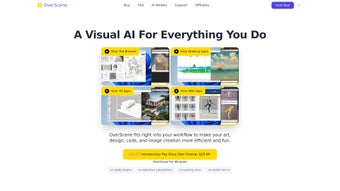
OverScene is a revolutionary AI-powered desktop application that transforms how creative professionals and hobbyists interact with their tools. Designed to seamlessly integrate with existing software—like drawing apps, 3D modeling platforms, and web-based tools—OverScene enhances workflows without requiring plugins or complex setups. With its intelligent overlay system, users can convert screenshots into clean code, turn rough sketches into polished digital artworks, and instantly generate photorealistic 3D renders.
The 'floating frame' feature allows one-click transformations, turning wireframes into functional code or simple shapes into detailed 3D models. Built with cutting-edge AI, OverScene works across Windows, Mac, Android, and iOS, making it a versatile companion for artists, developers, and designers. Whether you're prototyping a UI, coding a web interface, or refining a 3D concept, OverScene accelerates your process with minimal effort.
Its lightweight design ensures smooth performance, even on older systems, while maintaining top-tier security and privacy. With regular updates and a user-friendly interface, OverScene is the ultimate tool for boosting productivity and creativity in the digital workspace.
Key Features of OverScene
OverScene stands out in the crowded creative software market due to its powerful yet intuitive AI-driven features. One of its most impressive capabilities is screenshot-to-code conversion. Simply capture a UI design or layout, and OverScene instantly generates clean, functional HTML, CSS, and JavaScript code—perfect for web developers and frontend designers who want to speed up prototyping.
This feature eliminates tedious manual coding and reduces errors, saving hours of work. Another standout is the sketch-to-masterpiece transformation. Whether you're a beginner with rough hand-drawn ideas or a professional refining a concept, OverScene uses advanced generative AI to enhance your sketch into a high-resolution, professional-grade artwork.
This is especially useful for illustrators and concept artists who want to iterate quickly.
The 3D model enhancement tool is another game-changer. Users can import basic wireframes or low-poly models and instantly apply realistic textures, lighting, and details to produce stunning visualizations. This is ideal for game developers, architects, and product designers who need to present polished models without spending hours on rendering. The floating frame interface is a unique innovation—activating it with a single click allows you to drag and drop any content into the overlay, triggering instant AI processing. Whether you're converting a wireframe into code or turning a simple shape into a photorealistic 3D object, the process is seamless and intuitive.
OverScene also integrates with leading AI platforms like OpenAI, Stability AI, and Google’s Imagen, ensuring access to the latest generative models. This means better results, faster processing, and continuous improvement with each update. The software supports real-time collaboration, allowing teams to work on shared projects with AI-assisted suggestions. With automatic updates and a secure cloud sync, OverScene keeps your data safe while ensuring you always have the latest features. These capabilities make it one of the most versatile and future-ready creative tools available today.
How to Install and Use OverScene
Installing OverScene is quick and straightforward, making it accessible even for users with minimal technical experience. Start by visiting the official website and clicking the “Download” button. Choose the version that matches your operating system—OverScene is available for Windows 10/11, macOS Ventura and later, Android 10+, and iOS 15+.
The installer is lightweight, typically under 100MB, and completes in under a minute. Once installed, launch the app and sign in with your account (free registration available). The onboarding process guides you through setting up your preferences, including AI model selection, privacy settings, and integration with your favorite tools.
After setup, the real magic begins. To use the screenshot-to-code feature, press the designated hotkey (default: Ctrl+Shift+O) to activate the floating frame. Click anywhere on your screen to capture a UI element, and OverScene will analyze it, generating clean, responsive code within seconds.
For sketch enhancement, open your drawing app, sketch your idea, and use the same hotkey to send it to OverScene. The AI will refine edges, add shading, and convert it into a high-quality image. The 3D model upgrade function works similarly—import your model into OverScene, select the enhancement level, and watch as textures, lighting, and details are automatically applied.
OverScene also supports drag-and-drop functionality across multiple apps. You can drag a wireframe from Figma, a sketch from Procreate, or a low-poly model from Blender directly into the overlay. The AI processes it instantly, and you can export the result in your preferred format—PNG, SVG, OBJ, or GLTF.
For teams, OverScene offers a shared workspace where multiple users can collaborate in real time, with AI suggestions appearing on-screen. All actions are logged securely, and data is encrypted both in transit and at rest. With its intuitive interface and one-click automation, OverScene is designed to fit into your workflow, not disrupt it.
Compatibility and System Requirements
OverScene is engineered for broad compatibility, ensuring it works seamlessly across a wide range of devices and platforms. It supports Windows 10 and 11 (64-bit), macOS Ventura, Sonoma, and later, Android 10 and newer, and iOS 15 and above. This cross-platform availability makes it ideal for creative teams using mixed devices. Whether you're on a MacBook Pro, a Windows laptop, or a tablet, OverScene delivers consistent performance and features.
System requirements are modest, making it accessible even on older hardware. For Windows and Mac, you’ll need at least 4GB of RAM, 1GB of free disk space, and a modern GPU with support for OpenGL 4.5 or Metal. On Android and iOS, the app runs smoothly on devices with 4GB RAM and a capable processor. OverScene is optimized for low latency, ensuring real-time AI processing without lag. It also works offline—though some advanced features require an internet connection for cloud-based AI models.
Integration with popular creative tools is one of OverScene’s strengths. It works with Figma, Adobe XD, Blender, Sketch, Procreate, Visual Studio Code, and web-based platforms like Webflow and Webflow. The app uses native APIs to communicate with these tools, ensuring data flows securely and efficiently.
No plugins or third-party extensions are required—OverScene operates as a standalone overlay. This makes it a lightweight alternative to heavy, resource-intensive software suites. Whether you're a solo artist or part of a large studio, OverScene adapts to your setup and enhances your existing workflow without friction.
Pros and Cons of OverScene
Pros
- AI-Powered Intelligence – Converts screenshots to code, sketches to masterpieces, and wireframes to 3D models instantly.
- One-Click Installation – Simple setup with no technical knowledge required.
- Cross-Platform Support – Works on Windows, Mac, Android, and iOS.
- Lightweight & Fast – Minimal system impact, even on older devices.
- Secure & Private – Data encryption and optional offline mode protect user privacy.
- Regular Updates – Continuous improvements with new AI models and features.
Cons
- Internet Required for Advanced Features – Some AI functions need a stable connection.
- Learning Curve for Advanced Workflows – Power users may need time to master all customization options.
- Subscription Model – Free version has limited features; full access requires a paid plan.
Frequently Asked Questions (FAQ)
- Is OverScene free to download and use?
-
Yes, OverScene offers a free version with core features like basic screenshot-to-code conversion and sketch enhancement. However, advanced AI models, 3D rendering, and team collaboration require a paid subscription. The free tier is perfect for hobbyists and casual users.
- Can I use OverScene without an internet connection?
-
Yes, OverScene supports offline mode for basic functions like local sketch enhancement. However, advanced AI features such as code generation and 3D model rendering require an active internet connection to access cloud-based AI models.
- Which apps does OverScene integrate with?
-
OverScene integrates with Figma, Adobe XD, Blender, Sketch, Procreate, Visual Studio Code, Webflow, and most web-based design tools. It works as a universal overlay, so you can use it with any app that supports screen capture or drag-and-drop.
- How often does OverScene receive updates?
-
OverScene releases updates every 2–3 weeks, introducing new AI models, performance improvements, and bug fixes. Users are notified automatically, and updates are applied seamlessly in the background.
- Is my data safe when using OverScene?
-
Absolutely. OverScene uses end-to-end encryption for all data transfers and stores files securely in the cloud. You can also enable offline mode to keep sensitive projects private. No third parties access your content.
Conclusion: Why OverScene is a Must-Have for Creatives
OverScene isn’t just another creative tool—it’s a paradigm shift in how we interact with digital design and development. With its AI-powered overlay, one-click transformations, and seamless cross-platform compatibility, it empowers artists, developers, and designers to work faster, smarter, and more creatively. Whether you’re turning a rough sketch into a masterpiece or generating code from a screenshot, OverScene removes friction from your workflow. Its lightweight design, strong privacy measures, and regular updates ensure long-term reliability and performance.
While the free version offers solid value, the premium plan unlocks the full potential of AI-driven creativity. If you're serious about boosting productivity and staying ahead in a competitive field, OverScene is a must-download. Don’t miss the chance to experience the future of desktop enhancement. Download OverScene today and transform your creative process in seconds.



.png)



